Segment Anything (SAM)
SAM runs entirely on your local machine and is very resource-intensive. A powerful PC with a dedicated GPU and sufficient RAM is strongly recommended. Use at your own risk — running SAM on underpowered hardware may cause slowdowns or crashes.
ONE AI integrates Meta's open-source Segment Anything Model (SAM v3) for AI-assisted dataset annotation. SAM runs locally on your machine and produces pixel-perfect segmentation masks from text prompts or bounding box inputs.
Overview
The SAM tool accelerates dataset labeling by automatically generating segmentation masks. Instead of manually drawing pixel-level annotations, you can:
- Text-prompt segmentation — Type the object name and SAM produces a segmentation mask within seconds.
- Smart Fill Brush — Draw a bounding box around a target, select the label, and SAM automatically detects the object shape and draws the segmentation.
Usage
- Open an image in the Annotation Tool
- Click the SAM tool in the annotation toolbar
- Select a SAM model variant based on your available hardware
- Use text prompts or the smart fill brush to generate masks
- Review and refine annotations as needed
Model Variants
SAM v3 ships in three size variants, each available in FP16 (higher accuracy) and INT8 (smaller footprint) quantization:
| Variant | Resolution | Speed | Accuracy | Recommended For |
|---|---|---|---|---|
| Small / Fast | 644 px | Fastest | Good | Mid-range GPU (e.g. GTX 1660, RTX 3050) |
| Medium / Balanced | 1008 px | Moderate | Better | High-end GPU (e.g. RTX 3080, RTX 4070 or better) |
| Large / Slow | 1344 px | Slowest | Best | Top-tier GPU (e.g. RTX 4090, A6000) |
Download Details
| Model | Quantization | Size | SHA-256 |
|---|---|---|---|
onnx_644_fp16.zip | FP16 | 1.63 GB | b3f2b6e11607f9e7f4798689945ecb7319803ef2a78a8f6292759dc04f2bd863 |
onnx_644_int8.zip | INT8 | 1.74 GB | 51f57535d023cd494fb0f2a26b75bee58e1a637eaf046f3c5fa4a10f52d329e5 |
onnx_1008_fp16.zip | FP16 | 1.63 GB | f2195bb3ece9b335b3cad411ec1f117bb248548d5a02a9e195be415f9c76a0e6 |
onnx_1008_int8.zip | INT8 | 1.75 GB | 2f1a1f34c154328a0aed006849d5750880e6fde11ac0b5df629c84869483eee2 |
onnx_1344_fp16.zip | FP16 | 1.64 GB | f91016c9e63b5e7d743644098defe04d453ebe251a96bc23b755f832a35c1f11 |
onnx_1344_int8.zip | INT8 | 1.76 GB | 8fe13cf5dcb6ab31494a65167cbb5193e464d4a94e35516f9cd110dac26c1830 |
FP16 models provide slightly higher segmentation accuracy. INT8 models are quantized for faster inference on hardware with INT8 acceleration support (e.g., NPUs).
The Small (644 px) INT8 variant can run on a laptop CPU without a dedicated GPU, but expect significantly longer inference times and high RAM/CPU usage. This is only practical for occasional use or testing — a dedicated GPU is strongly recommended for regular annotation work.
ONNX Runtime Support
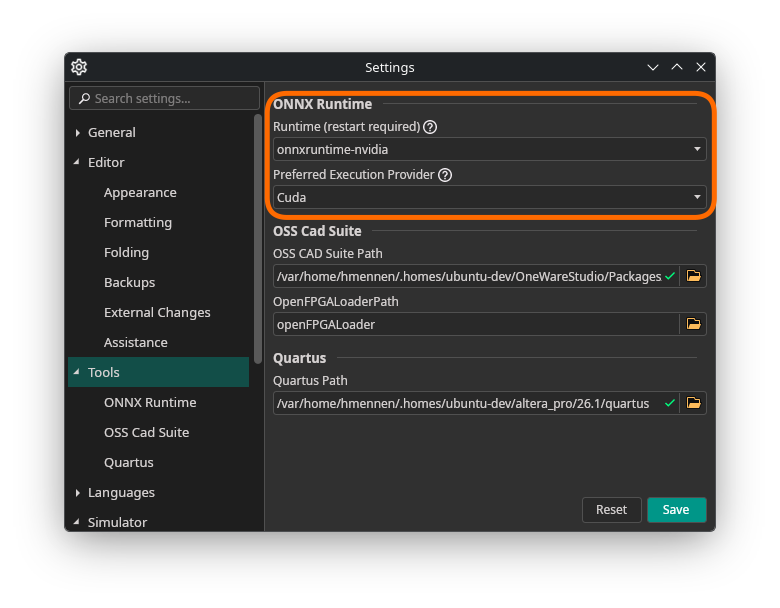
Since SAM models are large and computationally intensive, ONE AI supports GPU and NPU acceleration via ONNX runtimes. Install runtime support directly from OneWare Studio's extension manager.

For Windows with a dedicated GPU, DirectML is recommended as it requires no additional driver installation. After installation, you can switch between available runtimes in the Settings at any time.
Bulk Actions with SAM
SAM integrates with the Bulk Actions feature to automatically label many images at once:
- Select multiple images in the dataset view
- Choose Auto-label with SAM from the bulk actions menu
- SAM processes all selected images and generates annotations
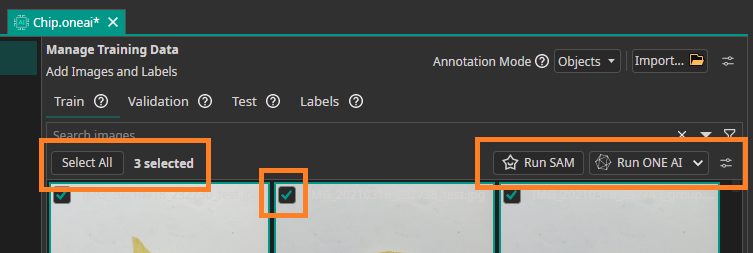
This enables rapid bootstrapping of segmentation datasets — annotate a few images manually, then use SAM to handle the rest.
Need Help? We're Here for You!
Christopher from our development team is ready to help with any questions about ONE AI usage, troubleshooting, or optimization. Don't hesitate to reach out!