New ONE AI project
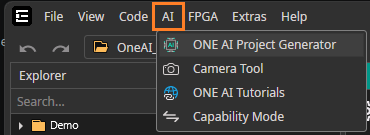
Follow these steps to create a new ONE AI project. To get started, click on AI -> ONE AI Project Generator.
Step 1: Project Settings
The project generator guides you through the configuration of your new project. Choose the values that match your requirements.
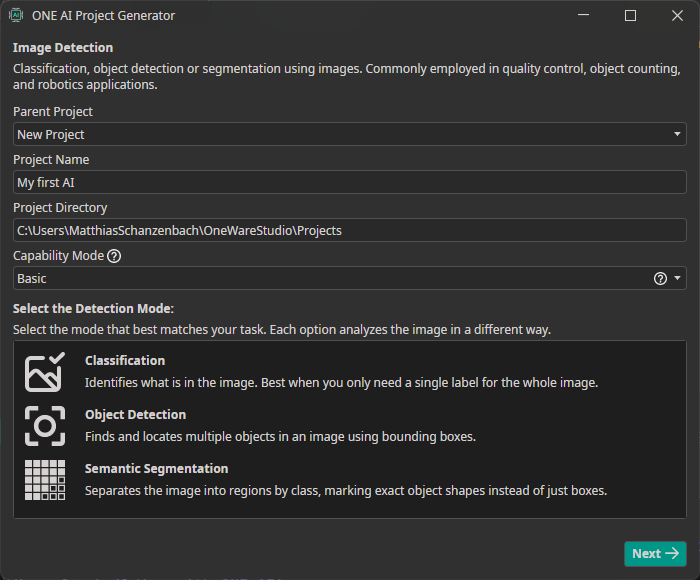
Property Description
| Property | Description |
|---|---|
| Parent Project | <NewProject> creates a new project in its own directory. Selecting a parent project lets you train multiple projects with individual settings on the same dataset. |
| Project Name | Name of the project |
| Project Directory | Target directory |
| Capability Mode | Basic or Advanced mode |
| Annotation Mode | Type of annotations used in the project |
Step 2: Select a template
Templates provide you with initial project settings. Select the template that fits your task:
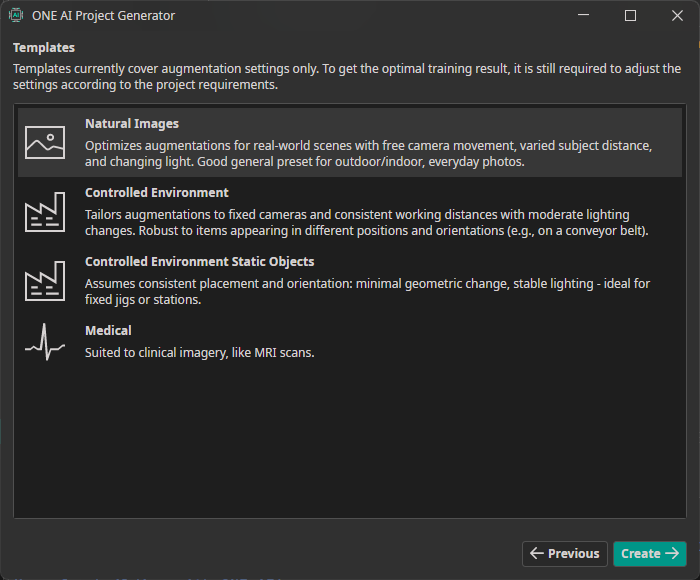
Templates only cover the basic settings, so you still need to adjust them to your needs.
Create
Click Create to generate the project. It opens automatically once it has been created.