Output Settings
The Model Settings tab allows you to tune the model generation to your individual needs. You can specify what parameters you want to predict, the required precision and how fast your model needs to be. For example, if the size of your objects is known, you can tell ONE AI to only predict object positions to save resources. To achieve the best results, you also need to make some estimates about your task, like specifying the expected size of objects or the overall complexity of the task.
We have a guide on choosing the right parameters, which explains the settings using different example tasks. If you're unsure whether your settings are correct, this is a great place to learn more.
Output Settings
In the Output Settings, you can control the output of your model and specify the amount of hardware resources it is allowed to use.
For Classification Tasks
Classification Type: The classification type determines how your model assigns classes to images:All Individual Classes: A single image can have multiple classes present, e.g. an image that shows a dog and a cat but no bird has the label (1, 1, 0).One Class per Image: A single image can only have one present class, e.g. only one of the classes no object, defective, valid can be true.At Least One Class? (Y/N): You have a dataset with different classes but are only interested in whether at least one class is present, e.g. you want to know if your product has a defect but it doesn't matter which defect.Regression(advanced): Label names are interpreted as continuous values (e.g. 0 L, 0.5 L, 1 L, 1.5 L, 2 L). Assign one label per image and the model predicts continuous values. When exporting as ONNX with pre/postprocessing, the output is mapped to the closest label name. Exporting without pre/postprocessing or using TFLite / VHDL returns the exact predicted value.
For Object Detection Tasks
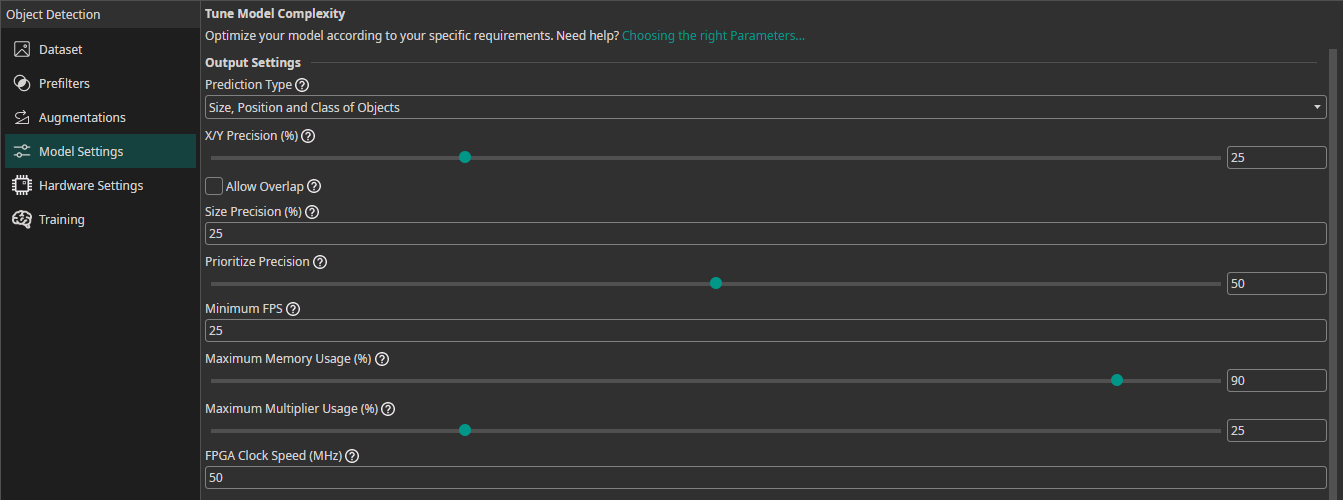
Prediction Type: The prediction type determines what parameters your model needs to predict. If you need to predict fewer parameters, ONE AI is able to generate a simpler model that requires fewer computations. Some of the options convert the object detection task to a classification task. This allows you to use a dataset that is already annotated with object bounding boxes for training a classification model. ONE AI converts the labels after applying data augmentation, which is more precise than converting the dataset in the beginning, e.g. if one of the objects is moved out of frame.Size, Position and Class of Objects: The model predicts the size, position and class for each detected object.Position and Class of Objects: The model only predicts the position and class of detected objects. This setting is useful when you already know the size of the objects, e.g. the images show a conveyor belt and the objects always have the same size.All Present Object-Classes(converts to classification): The model predicts which objects are present in the image but provides no further information on their size or location. For example, this option can be used for quality control to detect the presence of different types of defects.Class with Largest Combined Object Area(converts to classification): The model predicts the object class that occupies the largest combined area within the image.Class with Most Objects(converts to classification): The model predicts the object class that appears in the image the most.At Least One Object? (Y/N)(converts to classification): The model predicts whether at least one object is present in the image or not.
Position Prediction Resolution (%): Sets the resolution level for predicting x and y coordinates. At 100%, positions are predicted with pixel-level accuracy. Lower values (e.g. 10%) reduce the resolution grid (e.g. 64×48 instead of 640×480), which increases speed and can help the model generalize better.Allow Overlap: Controls how objects that fall within the same grid cell are handled. When enabled, objects in the same cell are merged. When disabled, ONE AI automatically refines the grid to avoid overlap and detect each object separately.Size Prediction Effort (%): Controls the computational effort for predicting object sizes. At 100%, the model uses more neurons for accurate size predictions. At 25%, complexity is reduced for faster predictions, which is sufficient for most applications.Precision Recall Prioritization: Adjusts the model's balance between false positives and false negatives. Values below 50% focus on reducing false positives (fewer incorrect detections). Values above 50% focus on reducing false negatives (fewer missed detections). Set to 50% for a balanced approach.Optimize Small Objects: Enables additional optimization to improve detection quality for small objects in images.
For Segmentation Tasks
Segmentation Type: Defines the output format for segmentation models:One Class per Pixel: The model outputs a segmentation matrix with the corresponding class for each pixel.Size, Position and Class of Objects: The model outputs detailed predictions including object size, exact position, and class for each detected object.Position and Class of Objects: The model predicts the location and class of each object without specific size information.All Present Object-Classes(converts to classification): The model identifies all classes of objects present in the image without positional or size details.Class with Largest Combined Object Area(converts to classification): The model predicts the object class that occupies the largest combined area within the image.Class with Most Objects(converts to classification): The model predicts the object class appearing most frequently within the image.At Least One Object? (Y/N)(converts to classification): The model provides a binary prediction indicating whether at least one object is present.
Position Prediction Resolution (%): Same as for object detection — controls the grid resolution for position predictions.Segmentation Resize Threshold (%): When resizing the segmentation mask, the area of the segmented object below a pixel is calculated. This threshold controls what percentage of area is sufficient to mark a pixel as belonging to an object.Precision Recall Prioritization: Same as for object detection — adjusts the balance between false positives and false negatives.
Hardware Usage Settings
Minimum FPS: The minimum number of images the model needs to process per second with hardware selected in theHardware Settingstab.Maximum Memory Usage (%): You can limit the amount of memory that the predicted model will use.Maximum Multiplier Usage (%): You can also limit the amount of DSP elements that the predicted model can use. If you aren't using an FPGA this setting is ignored.FPGA Clock Speed (MHz): If you are using an FPGA, you need to provide its clock speed. Otherwise, this setting is ignored.

Need Help? We're Here for You!
Christopher from our development team is ready to help with any questions about ONE AI usage, troubleshooting, or optimization. Don't hesitate to reach out!